
Enhancing User Engagement: The Art of Designing Clickable URL Buttons for Modern Websites
- schooloffiche
- Dec 1, 2024
- 2 min read

Updated: Dec 26, 2024

Introduction:
Smooth navigation is essential for a positive user experience. One effective method to improve navigation within your Laserfiche forms is by adding clickable buttons that link to specific websites. Not only do these buttons streamline the user journey by directing users to additional resources, external forms, or informative web pages, but they also enhance the visual appeal of your forms. A well-designed button can draw attention, provide clear direction, and contribute to a more engaging and aesthetically pleasing user interface.
Use Cases:
Resource Access: Link to external documents, tutorials, or instructional videos that provide additional information or guidance related to the form’s content.
Event Registration: Redirect users to event registration pages, allowing them to sign up for webinars, workshops, or conferences directly from the form.
Compliance and Policies: Direct users to legal documents, privacy policies, or terms and conditions that they need to review before completing the form.
Test Version: Laserfiche Forms Professional Version 11.0.2311.50564
Setup: Download codes from Bait and Tackle "Create a clickable URL button"
Create a clickable button to a URL - Modern Designer
Add a Custom HTML field to your form.
Select the Code View.
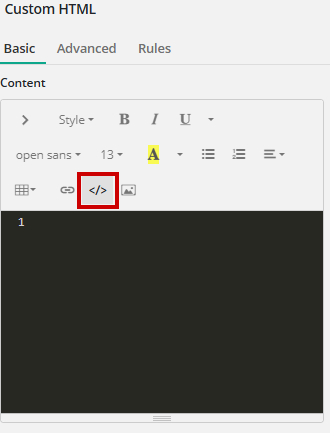
Copy and paste the HTML code from "Create a clickable URL button".
This will create a Click Me labeled button.
Change "Click Me" to any verbiage needed for your custom button.

Select CSS in the top right corner.

Copy and paste the CSS code from "Create a clickable URL button" into CSS to apply styling to enhance your button.

Select JS next to CSS in the top right corner.

Copy and paste the JavaScript code from "Create a clickable URL button" into JavaScript to apply button functionality.
Change the URL accordingly.
The button will now take you to another webpage without closing out your form.
Reel in the Benefits of Clickable Buttons
By incorporating clickable buttons into your Laserfiche forms, you’re not just improving navigation—you’re casting a wide net for a better user experience. These buttons can hook your users, guiding them smoothly to the resources they need. So, don’t let your forms flounder; give them the bait they need to catch your users’ attention and keep them engaged. With these tips, you’ll be swimming in success in no time!


